Regain Control of Your Business
Has running your business taken over? We get it! We built Daylite to help you spend less time managing your business and more of it doing what you love.

Has running your business taken over? We get it! We built Daylite to help you spend less time managing your business and more of it doing what you love.





One of the biggest challenges small business owners face is a lack of time. As your business grows, you struggle to stay on top of increasing demands. There are prospects to follow up with, sales to track, and commitments that you promised to deliver to your clients on a daily basis. It’s easy to feel overwhelmed and fear the business will fail if you can’t keep up. Before long, and without even realizing it, you’ve lost the passion and drive you once felt.
It doesn’t need to be this way. Daylite can help you regain control of your business!
Daylite was made to help small businesses reduce the time it takes to manage clients, sales and projects. An app exclusively for your Mac, iPhone and iPad, that will help manage your business efficiently so you have more freedom to do what you love.

Start your 14-day trial
Download Daylite on your Mac, iPad, and iPhone.

Start using Daylite daily
Organize your business in one place.

Regain control!
Have more time to do what you love.
My business and I rely on Daylite. I spend less time determining which tasks are high priority and which tasks can wait. I spend less time looking through my emails or querying particular documents on my computer and hard drive. I spend less time trying to get up to speed on where I left a file. Consequently, I spend more time moving my clients’ files towards trial or resolution, and I’m able to achieve better results for them more quickly.
When you need to manage your clients, track your sales or deliver on projects, Daylite has the tools to make it effortless. Whether you want to focus on just one of these areas or tackle all three, Daylite has the flexibility to meet your needs.
Relationships are essential for every business. Daylite CRM helps you strengthen and nourish your client relationships by keeping track of communication and next steps so you're always on the ball no matter how big your client list grows.
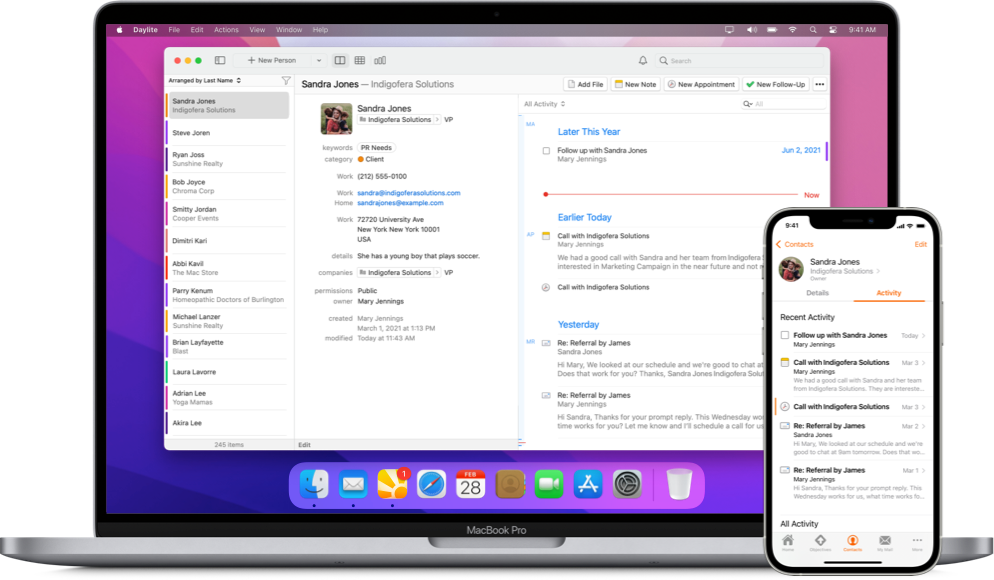

Remembering the little things makes clients feel special and builds trust. This opens the door to repeat business and more referrals. Daylite makes it easy to remember everything by keeping track of emails, notes, calls, and next steps in one place.

Say goodbye to things slipping through the cracks because info was stuck in someone's head or inbox. Daylite keeps your team in sync by organizing and sharing everything in one place. Worried about confidential info? Daylite's permissions have you covered.

When you want to narrow your contact list to find people in a specific industry or people you haven't touched base with in 6 months, Daylite makes it easy to find. Build customized lists that auto-update so you can stay top of mind and send personalized reach outs.

“Daylite has allowed us to increase our volume of business while still maintaining the high level of service our customers have come to expect.”
As you build relationships and opportunities emerge, tracking deals gets messy – especially when it takes weeks, months, or years to close. Lose sight of these deals and you're leaving business on the table. Daylite Sales helps you and your team stay on top of every deal from start to close no matter how many you have in the pipeline.
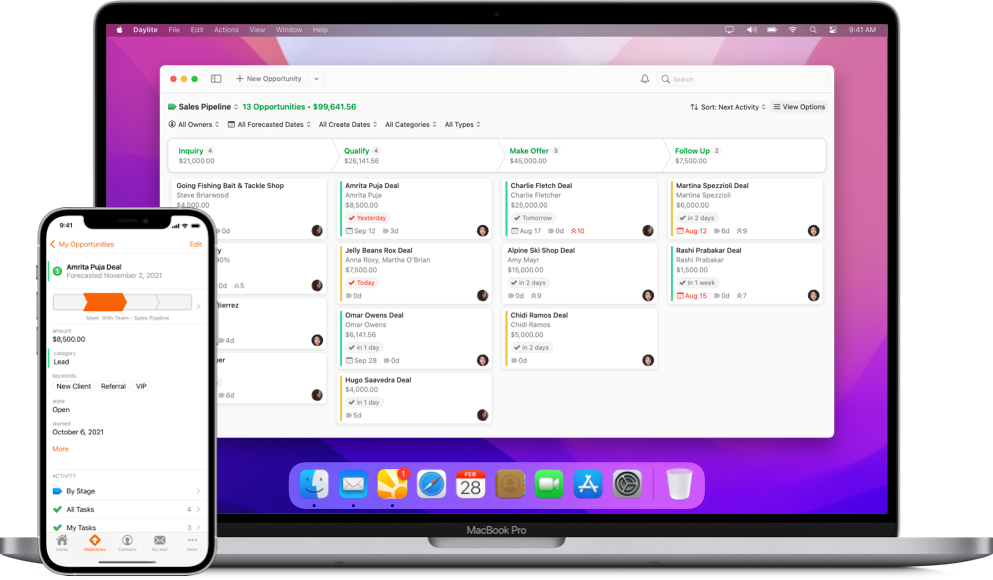

The more deals you have on the go and the larger your team grows, the harder it is to stay on top of the status of deals and what needs to be done to push each one forward. Daylite gives you an overview of where each deal is and what needs to happen next. Spend less time in status update meetings and more time closing deals.

Bringing in new business is an art of balancing your attention on the largest deals and the ones most likely to close. Daylite helps you prioritize your deals so you can focus on the right ones at the right time.

Know what's working and what's not so you can make informed decisions to increase your revenue. Daylite gives you visibility on your close rates, win/loss reasons, and top lead sources so you have the data to make better decisions and grow your business.
Daylite Projects helps you and your team collaborate more and execute client projects without worrying about things slipping through the cracks. Manage up to 5 times more projects with your current team.
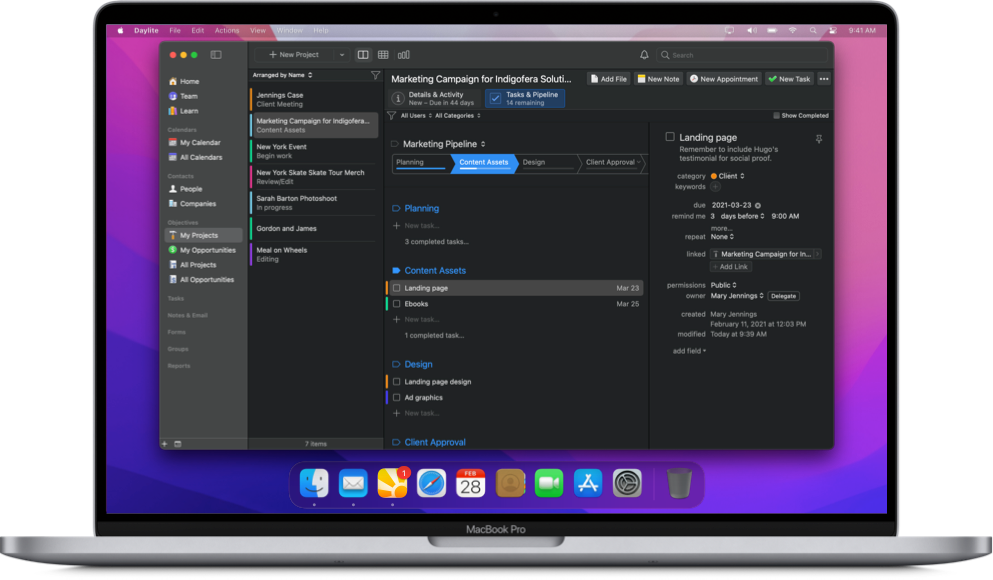

Say goodbye to the stress and chaos of trying to figure out what's been done on each project and what needs to be done next. Daylite gives you visibility on the status of each project and next steps so you're always on the ball.

Help your team work better with less meetings and fewer interruptions. Share project details, next steps, meeting notes, and delegate tasks with Daylite so everyone is on the same page.

Reduce cognitive overload and save time with Daylite's project templates. Automate creating next steps for new projects and various scenarios so you don't have to worry about steps getting missed.

“Daylite ramped up our capacity. It took us from being able to manage 50 projects to 250 projects with a similar staff size.”
With all the benefits of CRM, Sales, and Projects, Daylite Business allows you to spend less time managing clients, deals and projects, so you have more freedom to do what you love.
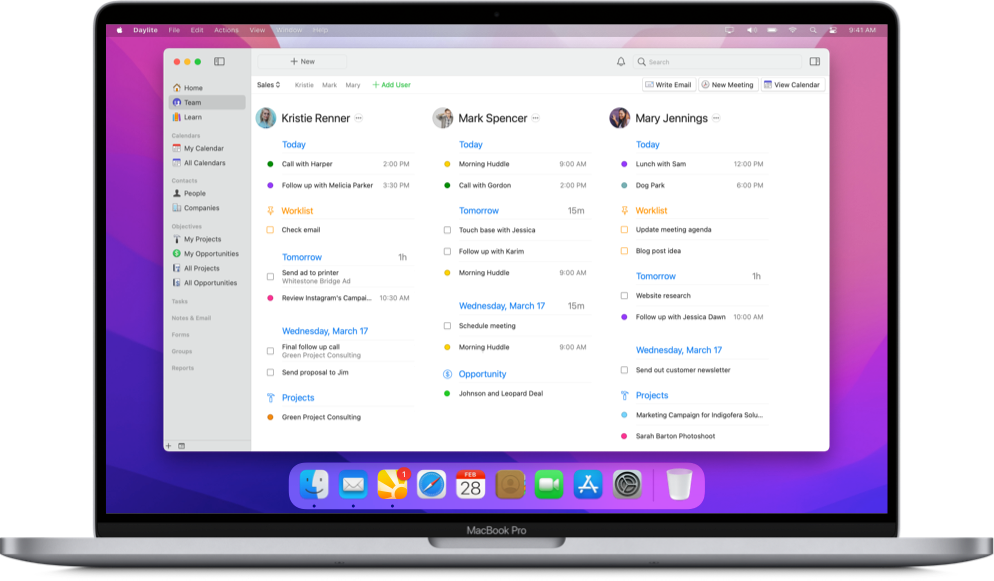

Keep track of all the important details and interactions about your clients in one place, so you can spend less time managing your client list and spend more time building stronger relationships with them.

Stay on top of every deal and streamline your sales process efficiently in one place, so you can spend less time managing your sales opportunities and spend more time closing your deals.

Stay on top of all the crucial details and organize all the moving pieces of your projects in one place, so you can spend less time managing your projects and spend more time completing your deliverables.

“We've seen amazing growth and Daylite has been a pivotal part of that success by allowing us to really ramp up our capacity and keep track of everything. It's definitely a program that grows with us as we do.”
Daylite is flexible and easily customizable. You can tailor it to fit your niche and set up workflows that help you improve efficiency in a way that works best for you.
Daylite works seamlessly with many of the built-in Apple apps and features you already know and love.
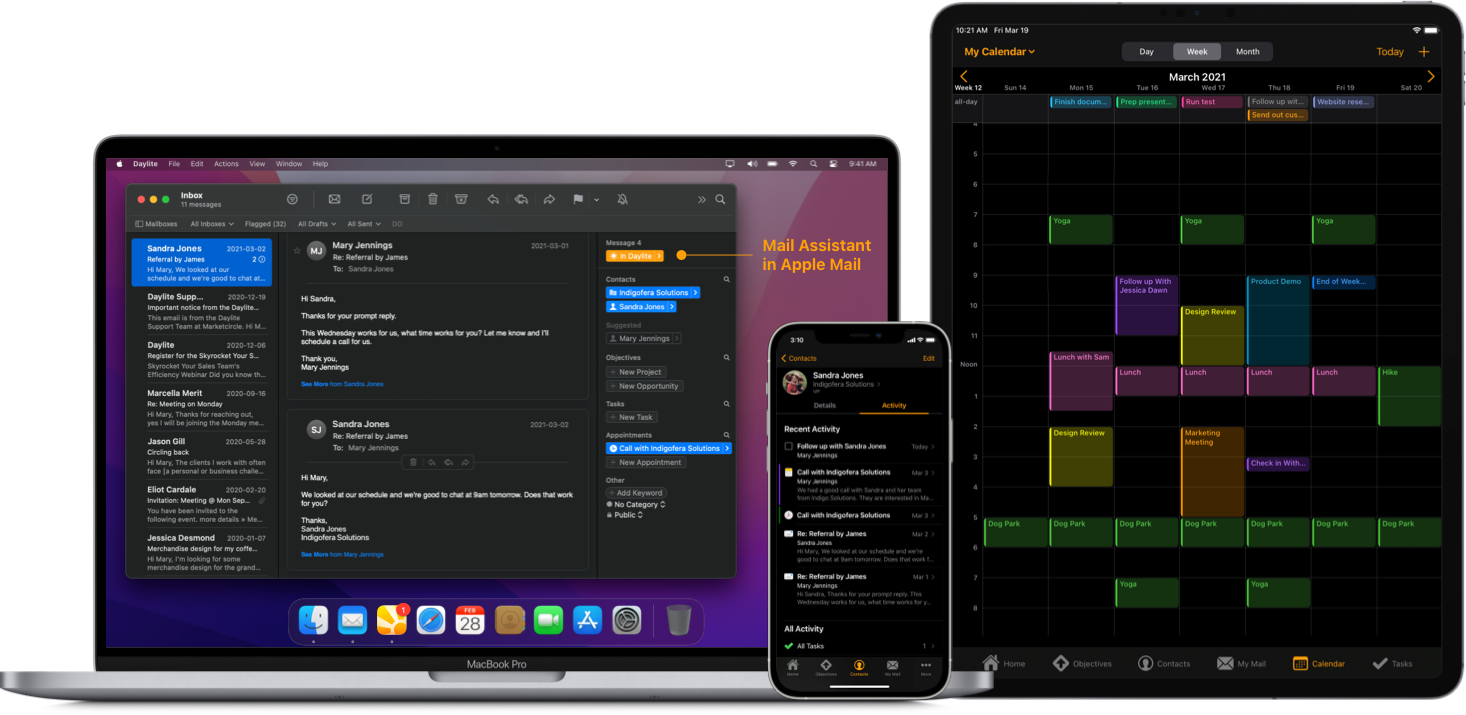

Clear out your inbox and stay on top of next steps. Save emails to clients, appointments, and tasks so you have a full history of conversations in one place. Plus you can create tasks in Daylite right from Apple Mail.

View your personal appointments in your Apple Calendar right in Daylite and vice versa.

Add Reminders to your iPhone or iPad hands-free while you’re on the go, and have them sync to Daylite.

Start FaceTime calls right from Daylite and use CallerID by setting up Apple Contacts sharing.

Keep your business data private by enabling FaceID, TouchID, and Passcode protection on iPhone and iPad.

Create contracts, reports, and other documents by pulling data from Daylite into Pages, Numbers, and Keynote (and of course, Microsoft Word and Excel).

Slow internet or no internet? No problem! Unlike other CRMs and Project Management apps that need a web browser, Daylite is a real Mac and iOS app. Access your data anywhere, anytime in a flash.
While Daylite is intuitive and faster to onboard than most CRMs and Project Management tools, learning a new system takes time and can feel overwhelming. We're here to help you get set up for success with both free and paid services for starting small or going big.
Talk to an Advisor





For over 20 years we've been helping people grow their businesses. Join our community of small businesses doing big things!




Daylite helps me to refocus on what I need to be doing right now. It helps me to focus on the activities that will grow revenue as opposed to being very busy doing a lot of things but not making the progress that I want. Daylite gives me the big picture and helps me refocus on what I need to be doing.
Start your 14-day trial
Download Daylite on your Mac, iPad, and iPhone.
Start using Daylite daily
Organize your business in one place.
Regain control!
Have more time to do what you love.